ULAK uygulama ikonu
Majka Solutions'tan bir iOS uygulamasıAn iOS app from Majka SolutionsApp Store

ULAK

İnternetsiz sesli çeviri.Offline voice translation.

İki kişi kendi dilinde konuşur, ULAK arada mesajı taşır. Telefonu ortaya koyun ve sırayla konuşun; kimin hangi dilde konuştuğunu kendisi anlar, çevirir ve sesli okur. Tanıma, çeviri ve seslendirme telefonun kendi üzerinde çalışır: uçakta, yurt dışında, veri paketi olmadan. Hiçbir şey cihazınızdan çıkmaz.Two people speak their own language; ULAK carries the message between them. Put the phone down between you and take turns: it works out who is speaking which language, translates, and reads it out. Recognition, translation and speech all run on the phone itself: on a plane, abroad, without a data plan. Nothing leaves your device.

  • İnternetsizWorks offline
  • 24 dil24 languages
  • iPhone, iOS 26
  • İndirmesi ücretsizFree to download
Tanıtım videosu: New York'ta bir taksi, sıfır İngilizce.Promo video: a taxi in New York, zero English.

Düğmeye basıp "şimdi ben konuşuyorum" demenize gerek yok.You never have to press a button to say "my turn".

  1. 01

    İki dili aynı anda dinlerIt listens to both languages at once

    Konuşmanın başında iki dili seçersiniz. ULAK ikisini birden dinler ve hangi dilin konuşulduğuna kendisi karar verir; sıra devrederken hiçbir şeye dokunmazsınız.You pick two languages at the start. ULAK listens for both and decides which one is being spoken; you touch nothing when the turn passes.

  2. 02

    Kendi sesini duymazIt doesn't hear itself

    Çeviriyi hoparlörden okurken kendi sesini yakalayıp yeniden çevirmeye kalkmaz. Bu yüzden kulaklık gerekmez; telefonu masaya koymanız yeter.While reading a translation aloud it won't pick up its own voice and translate it again. That's why no headphones are needed: just put the phone on the table.

  3. 03

    Anlamadığında dinlemeyi kesmezWhen it doesn't catch something, it keeps listening

    Gürültülü bir yerde bir cümleyi kaçırırsa "anlayamadım" der ama mikrofonu kapatmaz. Tekrarladığınız anda yakalar; aynı şeyi iki kez söylemek zorunda kalmazsınız.If it misses a sentence in a noisy place it says so, but it does not close the microphone. It catches your repeat straight away, so you never say the same thing twice.

  4. 04

    Yazıyla da çalışırIt works with typing too

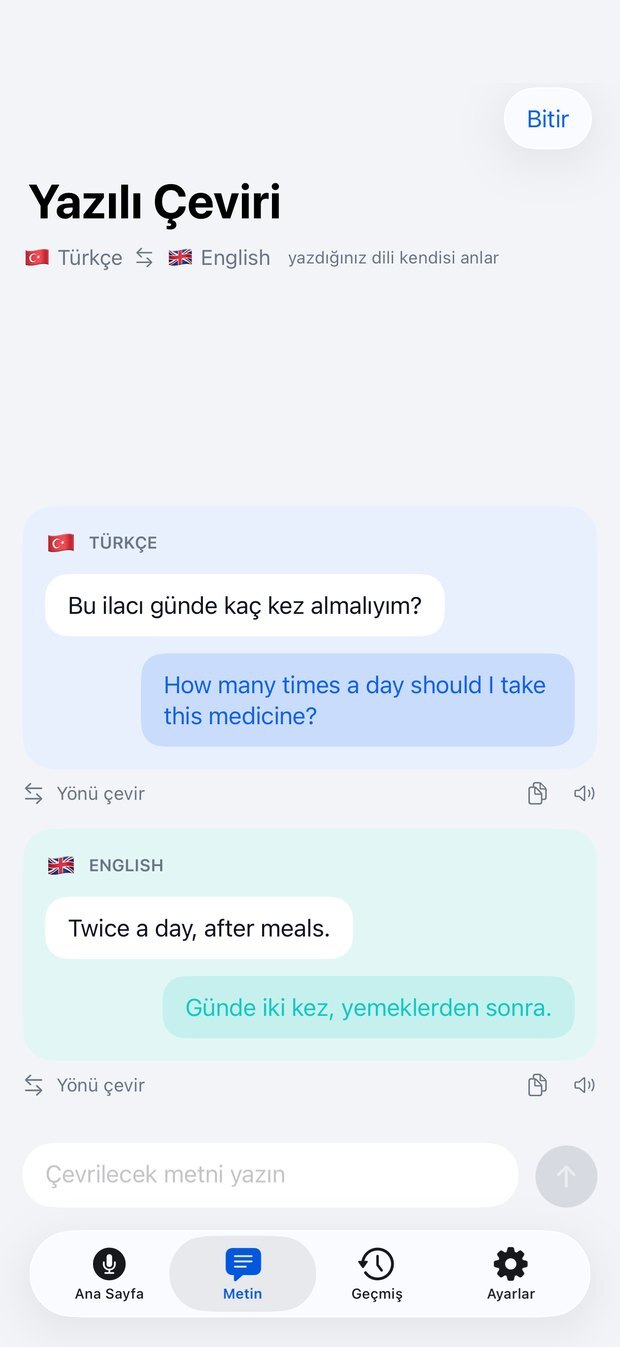
    Konuşmanın uygun olmadığı yerlerde yazarsınız. Hangi dilde yazdığınızı seçmeniz gerekmez; ULAK anlar ve karşı dile çevirir.Where speaking isn't appropriate, you type. You don't have to pick which language you typed in; ULAK works it out and translates to the other one.

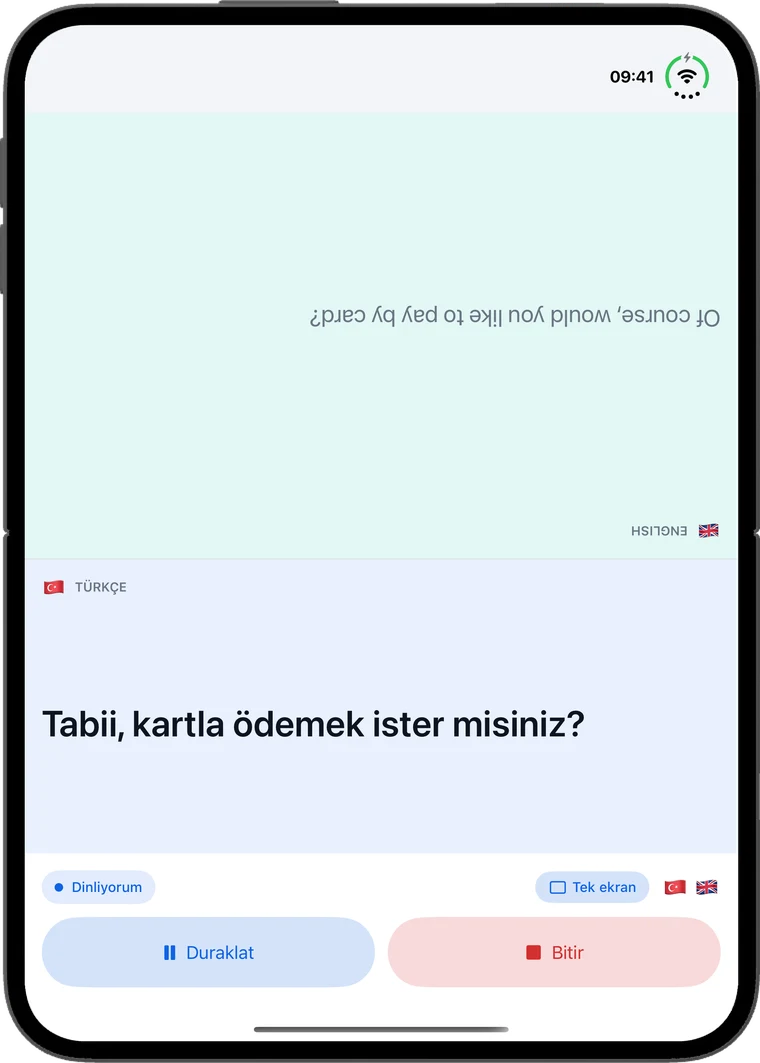
iPhone Duo masada açık: ULAK Karşılıklı kipte, üst yarı karşıdaki kişiye dönük
iPhone Duo, Karşılıklı kip: üst yarı karşıdakine döner, iki kişi tek telefonla konuşur.iPhone Duo, Face-to-face mode: the top half turns to the other person, two people talk over one phone.

1.5 ile yeni: iPhone Duo'da ilk günden.New in 1.5: on iPhone Duo from day one.

  1. 01

    Karşılıklı kipFace-to-face mode

    Katlanabilir iPhone Duo'yu açıp masaya koyun. Ekran ikiye bölünür, üst yarı karşıdaki kişiye döner; herkes kendi yarısında kendi dilini okur ve duyar.Open the foldable iPhone Duo and lay it on the table. The screen splits in two and the top half turns to face the other person; each of you reads and hears your own language on your own half.

  2. 02

    İki telefonla konuşmaTalk across two phones

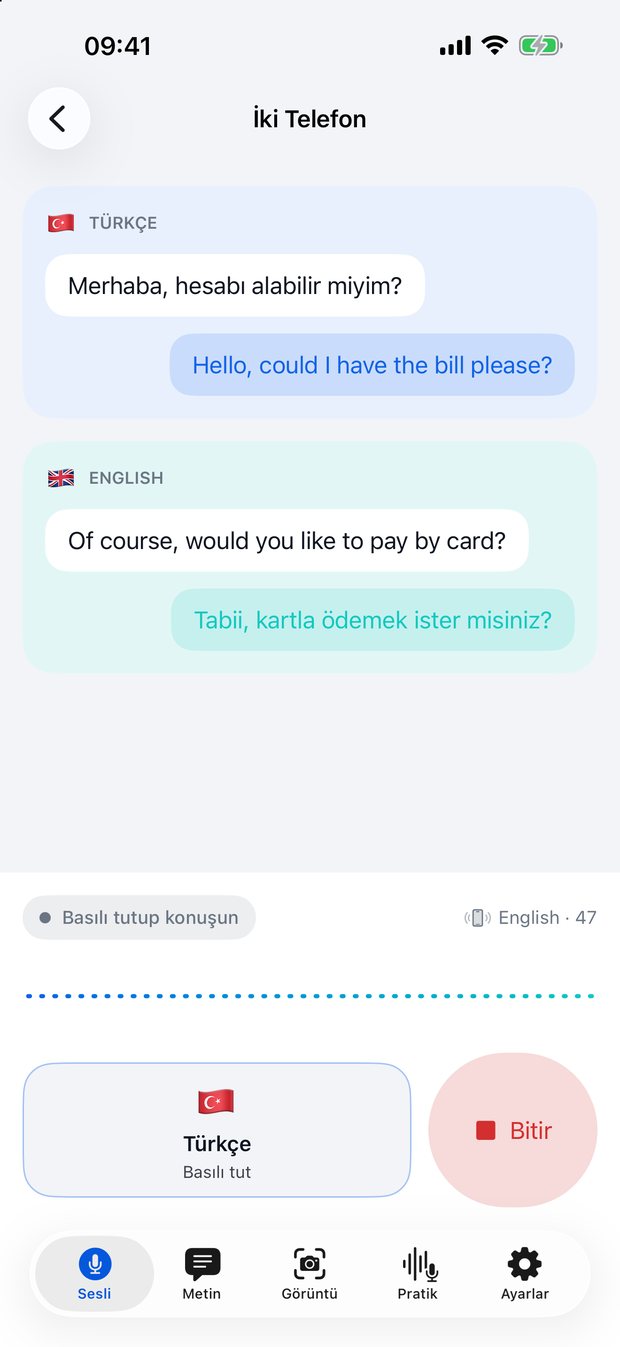
    Masada değilseniz herkes kendi telefonunda konuşur. İki ULAK yakındaki telefonu bulur, metin yerel ve şifreli bağlantıyla doğrudan karşıya gider; internete uğramaz.Not at a table? Each person talks on their own phone. Two ULAKs find each other nearby and the text goes straight across over an encrypted local connection, never through the internet.

  3. 03

    WhatsApp'ta çeviren klavyeA keyboard that translates in WhatsApp

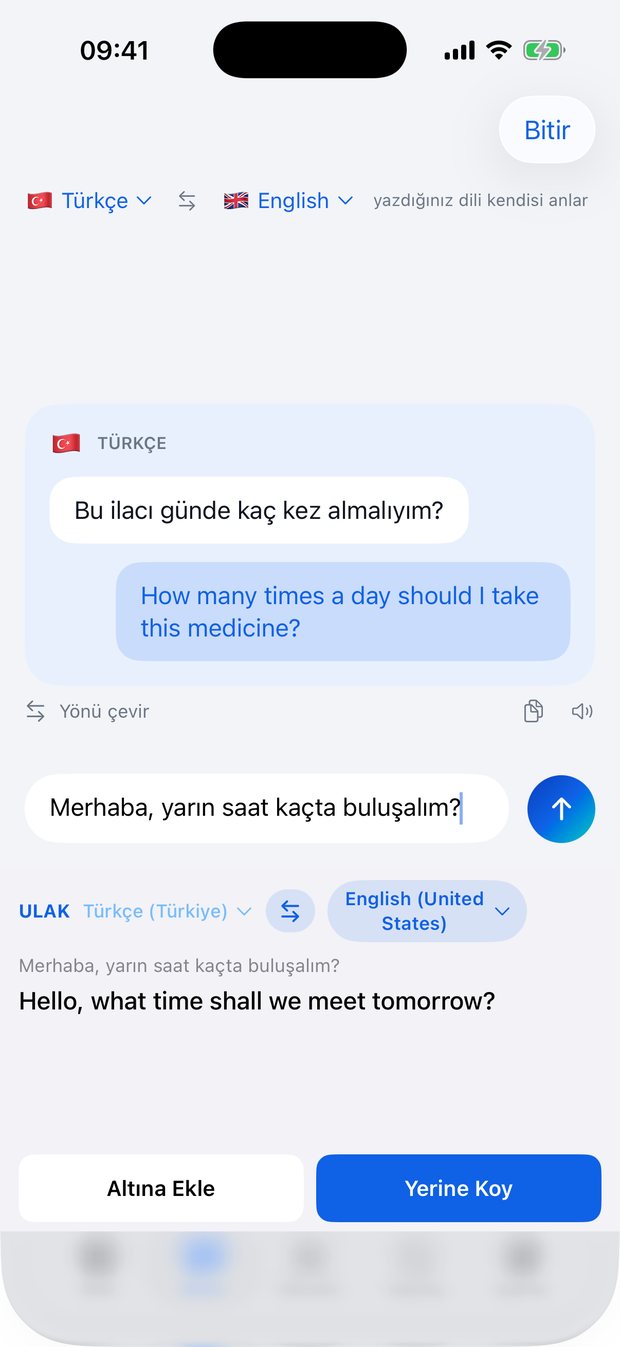
    ULAK klavyesi yazdığınızı ya da gelen mesajı mesajlaşma uygulamasının içinde çevirir; tek dokunuşla yerine koyar.The ULAK keyboard translates what you type, or the message you received, right inside your messaging app, and swaps it in with one tap.

  4. 04

    PratikPractice

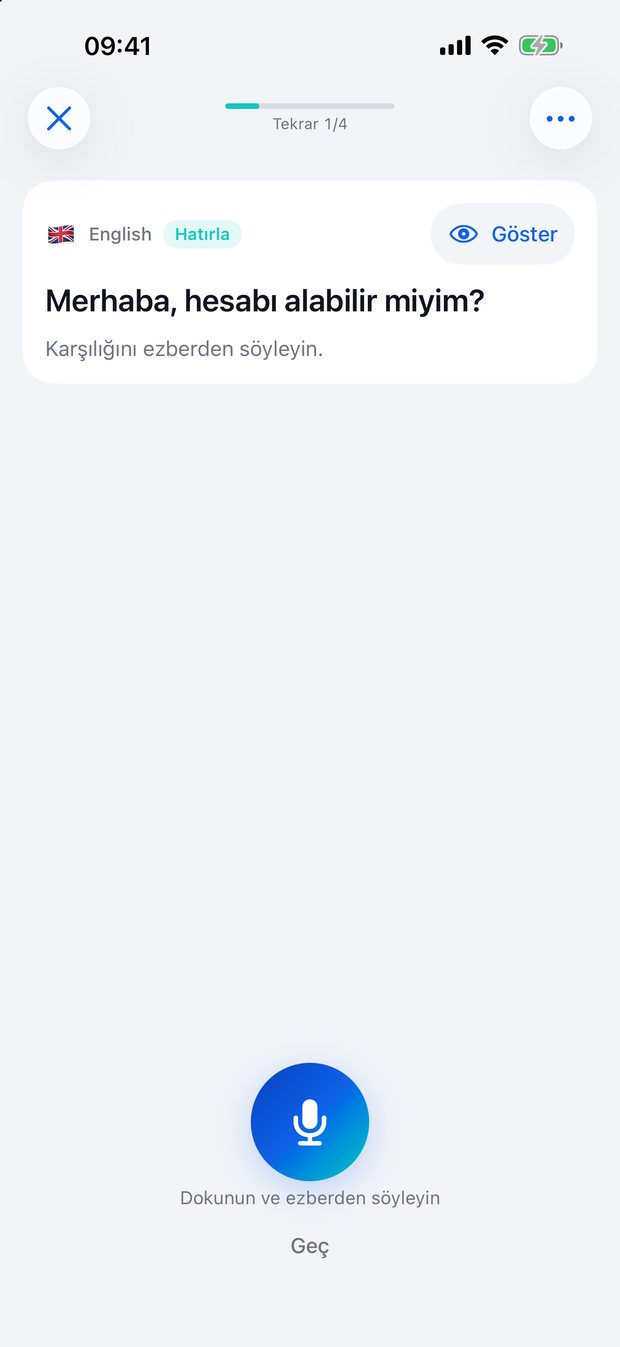
    Gerçekten konuştuğunuz cümleler dil öğrenme kartlarına dönüşür. Anlamını görürsünüz, karşılığını ezberden söylersiniz; ULAK söylediğinizi kelime kelime işaretler.The sentences you actually said become language-learning cards. You see the meaning and say the translation from memory; ULAK marks what you said word by word.

ULAK İki Telefon ekranı: Türkçe ve İngilizce mesajlar iki telefon arasında çevriliyor
İki Telefon: herkes kendi dilinde.Two Phones: everyone in their own language.
ULAK klavyesi: Türkçe cümle İngilizceye çevrilmiş, Yerine Koy düğmesi
Klavye: çeviriyi yerine koyar.Keyboard: swaps in the translation.
ULAK Pratik ekranı: kendi cümlenizin karşılığını ezberden söyleme kartı
Pratik: kendi cümleleriniz, kendi dersiniz.Practice: your own sentences, your own lessons.

İsim neden ULAK?Why the name ULAK?

ulak isim, Türkçenoun, Turkish

haberci, mesajı taşıyan kişi. İki taraf arasında gider gelir; sözü değiştirmeden ulaştırır.messenger, one who carries word. Goes back and forth between two sides, delivering the message unchanged.

  1. 1

    İşini birebir anlatıyor.It describes the job exactly.

    Uygulama tam olarak bunu yapıyor: mesajı bir taraftan alıp diğerine götürüyor.That is precisely what the app does: it takes the message from one side and delivers it to the other.

  2. 2

    Kendi dilimizden.From our own language.

    Yabancı bir kelimenin uyarlaması değil; kısa, net ve söylemesi kolay.Not an adaptation of a foreign word: short, clear, and easy to say.

  3. 3

    Araya girmiyor.It doesn't get in the way.

    İyi bir ulak kendini hatırlatmaz. Konuşan iki kişidir; uygulama yalnızca aradadır.A good messenger doesn't draw attention. The two people are the conversation; the app is only in between.

Konuşma sunucusu yok. Olmadığı için de konuşmanız bir yere gitmiyor.There is no conversation server. Because there isn't one, your conversations go nowhere.

Alışılmış yolThe usual way

Bulut tabanlı çeviriCloud-based translation

Sesiniz kaydedilip bir sunucuya gönderilir. Çeviri orada yapılır, sonuç geri gelir. İnternet yoksa uygulama çalışmaz; yurt dışında veri paketi ödemek gerekir. Konuşmanızın kopyası sizde değildir.Your voice is recorded and sent to a server. The translation happens there and comes back. Without internet the app doesn't work, and abroad you pay for data. A copy of your conversation isn't yours.
ULAK

Her şey telefonun kendi üzerindeEverything on the phone itself

Tanıma, çeviri ve seslendirme telefonun kendi üzerinde çalışır. Konuşmanız ve çeviriniz için hiçbir ağ isteği yapılmaz. Ham ses hiçbir yere kaydedilmez; kayıtlı geçmiş yalnızca sizin cihazınızda kalır ve dilerseniz hiç tutulmaz.Recognition, translation, and speech all run on the phone itself. No network request is made for your speech or translations. Raw audio is never recorded anywhere; saved history stays on your device only, or isn't kept at all if you prefer.

  • İnternet gerekmezNo internet needed
  • Ham ses kaydedilmezRaw audio is never recorded
  • Geçmiş yalnızca cihazınızda, isterseniz hiç tutulmazHistory on your device only, or not kept at all

Bu bir tercih değil, mimarinin sonucu: ULAK'ın arkasında konuşmaları tutan bir sunucu ya da veritabanı yok. Dolayısıyla bizim de erişebileceğimiz bir konuşma kaydı yok.This isn't a setting, it's the architecture: there is no server or database behind ULAK that holds conversations. So there is no conversation record for us to access either.

Gizlilik politikasını okuyunRead the privacy policy

24 dil, hepsi cihaz üzerinde.24 languages, all on the device.

İki dili seçersiniz, ULAK konuşanın hangisi olduğunu kendisi anlar.You pick two languages; ULAK works out which one is being spoken.

  • TürkçeTurkish
  • İngilizceEnglish
  • AlmancaGerman
  • FransızcaFrench
  • İspanyolcaSpanish
  • İtalyancaItalian
  • RusçaRussian
  • ArapçaArabic
  • Çince basitleştirilmişChinese Simplified
  • Çince gelenekselChinese Traditional
  • DancaDanish
  • FelemenkçeDutch
  • HintçeHindi
  • EndonezceIndonesian
  • JaponcaJapanese
  • KoreceKorean
  • NorveççeNorwegian
  • LehçePolish
  • Portekizce BrezilyaPortuguese Brazil
  • Portekizce PortekizPortuguese Portugal
  • İsveççeSwedish
  • TaycaThai
  • UkraynacaUkrainian
  • VietnamcaVietnamese

Bir kez indirilir, sonrası çevrimdışıDownload once, offline after that

Dil paketleri bir kez indirilir, sonrası çevrimdışıdır. Uygulamanın kendisi Türkçe, İngilizce, Almanca, Rusça ve Arapça konuşur.Language packs download once; after that everything is offline. The app itself speaks Turkish, English, German, Russian, and Arabic.

Sesi siz seçersinizYou choose the voice

Her dil için okuyan sesi ve konuşma hızını Ayarlar'dan ayarlarsınız. iOS'tan indirdiğiniz daha doğal sesler de listede çıkar.You set the reading voice and speaking rate for each language in Settings. More natural voices you download from iOS show up in the list too.

Sade ekranlar, fazlası yok.Simple screens, nothing more.

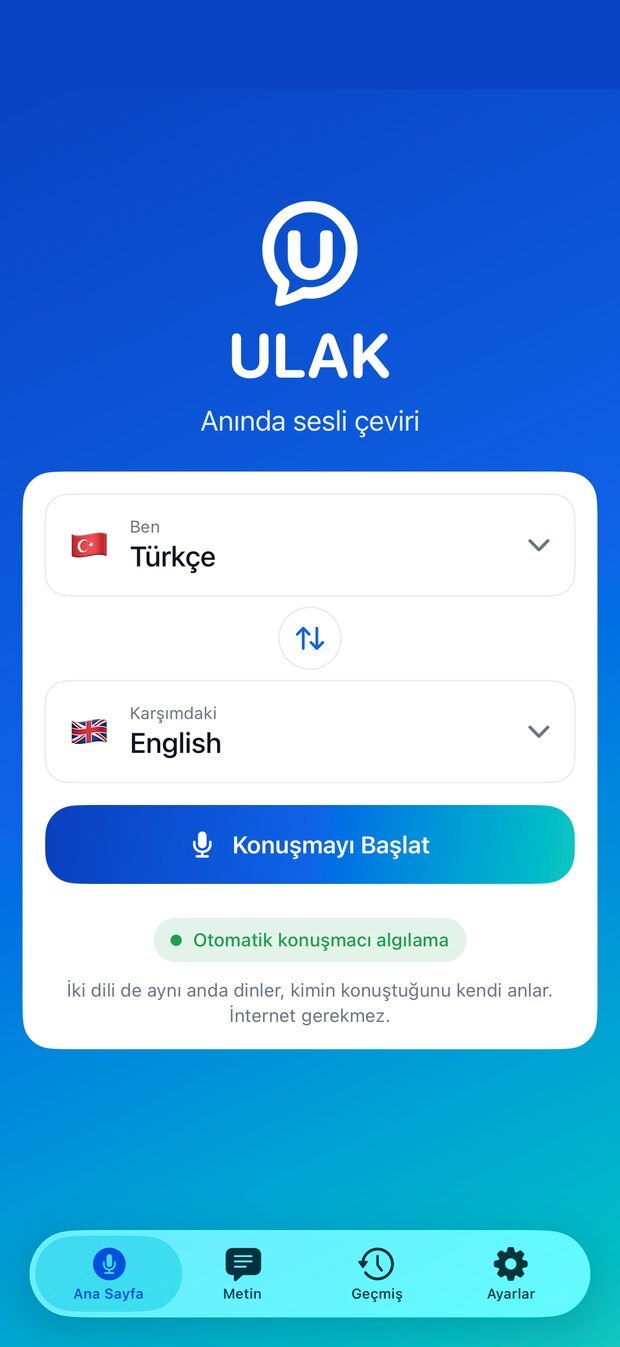
ULAK ana sayfası: iki dil seçimi ve Konuşmayı Başlat düğmesi
Ana Sayfa: iki dili seçin, konuşmayı başlatın.Home: pick two languages and start talking.
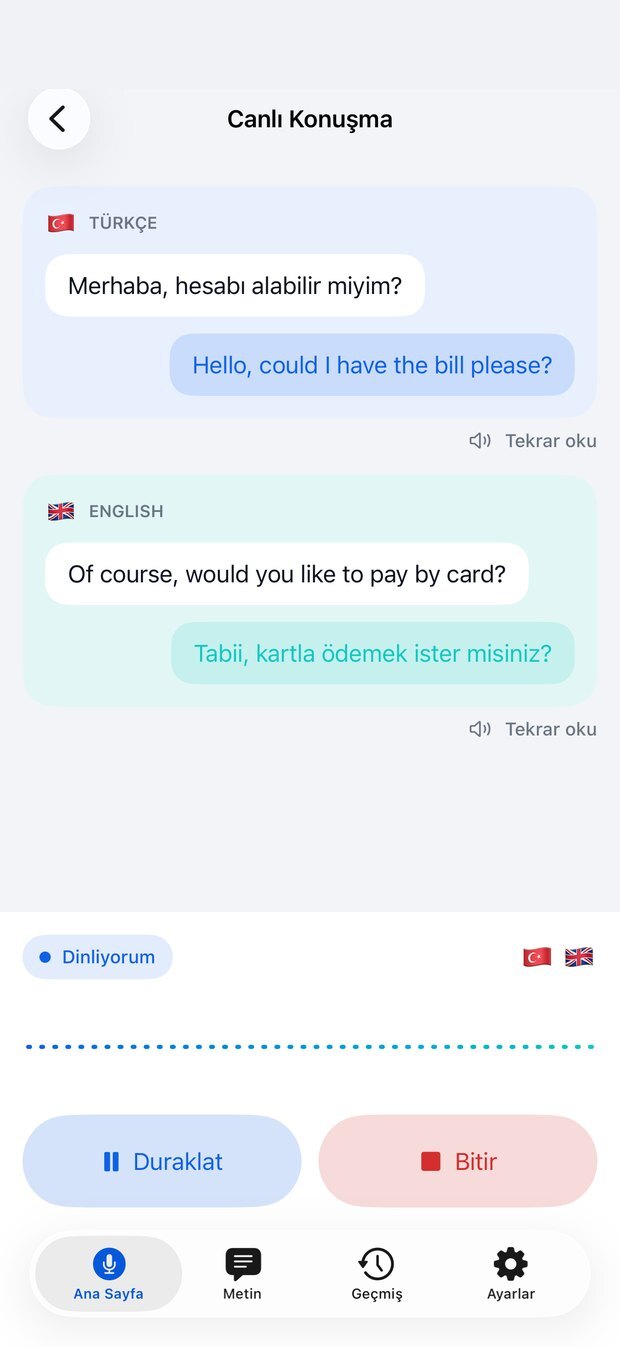
ULAK canlı konuşma ekranı: Türkçe ve İngilizce karşılıklı çeviri kartları
Canlı Konuşma: kim konuştuysa onun rengi.Live Conversation: each speaker has their own colour.
ULAK yazılı çeviri ekranı: Türkçe ve İngilizce yazılı çeviri kartları
Yazılı Çeviri: konuşamadığınız yerler için.Text: for the places you can't speak.
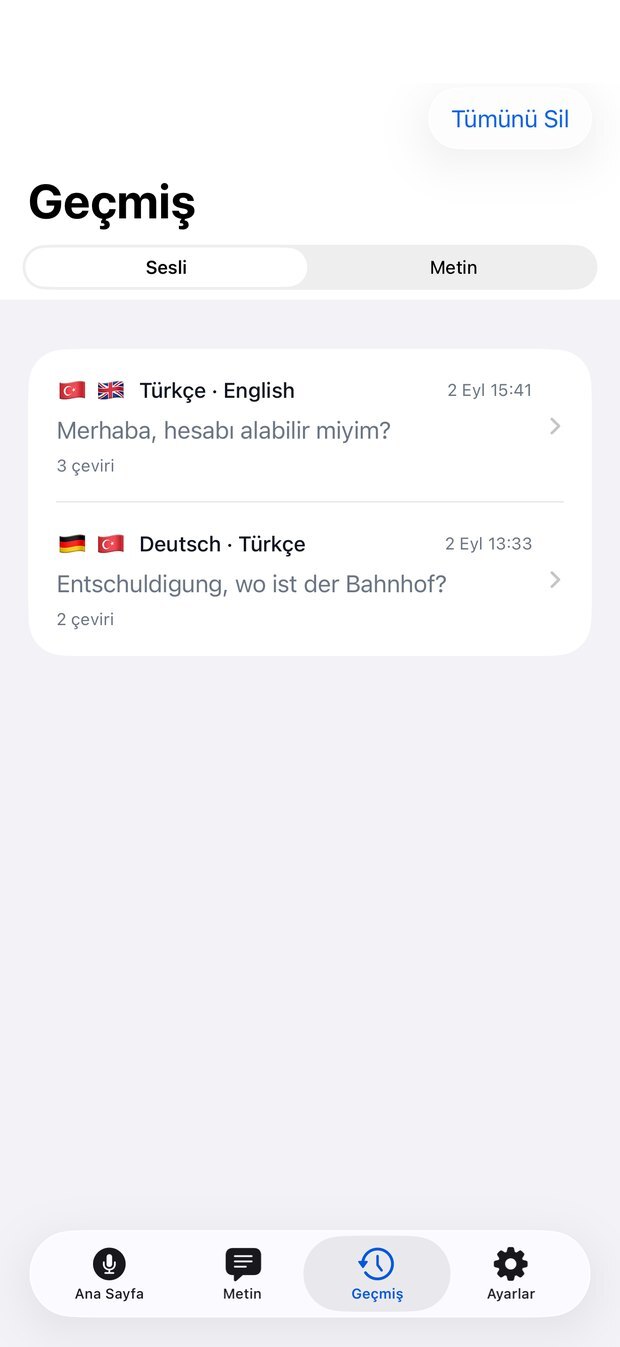
ULAK geçmiş ekranı: kayıtlı konuşmalar
Geçmiş: yalnızca cihazınızda, isterseniz hiç tutulmaz.History: on your device only, or not kept at all.

App Store'da yayında.Available on the App Store.

İndirmesi ücretsiz. Üyelik ya da hesap açmanız gerekmez.Free to download. No sign-up, no account.

Sık sorulanlarFrequently asked

Daha fazlası destek sayfasında.More on the support page.

Destek sayfasıSupport page

İnternet gerekiyor mu?Do I need the internet?

Hayır. Dil paketleri telefonunuza indikten sonra ULAK tamamen çevrimdışı çalışır: uçakta, yurt dışında, sinyalin olmadığı yerde de. Konuşma ve çeviri için internete hiç çıkmaz.No. Once the language packs are on your phone, ULAK works completely offline: on a plane, abroad, wherever there is no signal. Speech and translation never go online.

Dil paketleri nasıl iniyor?How do language packs download?

Kendiliğinden. Bir dili seçtiğinizde konuşma modeli inmeye başlar; çeviri paketi için Apple bir onay penceresi açar, orada İndir'e dokunmanız yeter. Tek seferlik bir iş. Apple aynı anda en fazla beş dile yer ayırır; altıncı dili seçince ULAK tutulan dillerden birini kaldırmanızı ister, seçili iki diliniz hiçbir zaman kaldırılmaz.On their own. When you pick a language its speech model starts downloading; for the translation pack Apple shows a confirmation, and you just tap Download. It is a one-time job. Apple keeps room for at most five languages at once; when you pick a sixth, ULAK asks you to remove one of the kept languages, and your two selected languages are never removed.

Kulaklık ya da AirPods gerekiyor mu?Do I need headphones or AirPods?

Hayır. ULAK telefonun hoparlörüyle çalışacak şekilde tasarlandı; kendi sesini duyup yanlışlıkla çevirmemesi için yankı filtresi var.No. ULAK is designed to work with the phone's speaker; it has an echo filter so it doesn't hear itself and translate by mistake.

Sesi daha doğal yapabilir miyim?Can I make the voice sound more natural?

Evet. iOS Ayarlar › Erişilebilirlik › Konuşulan İçerik › Sesler bölümünden o dile "Enhanced" ya da "Premium" bir ses indirin; indirdiğiniz ses ULAK'ın Ayarlar ekranındaki ses seçicisinde anında görünür.Yes. Download an "Enhanced" or "Premium" voice for that language under iOS Settings › Accessibility › Spoken Content › Voices; it shows up straight away in the voice picker in ULAK's Settings.

Konuşmalarım nerede saklanıyor?Where are my conversations stored?

Yalnızca kendi telefonunuzda, şifrelenmiş olarak ve yalnızca metin olarak; ham ses hiçbir yere kaydedilmiyor. Geçmiş sekmesinde bir konuşmayı sola kaydırarak tek tek ya da "Tümünü Sil" ile topluca silebilir, Ayarlar › Gizlilik altından geçmiş kaydını tamamen kapatabilirsiniz.Only on your own phone, encrypted, and only as text; raw audio is never recorded anywhere. In the History tab you can swipe a conversation left to delete it or delete them all at once, and you can switch history off completely under Settings › Privacy.

Yanlış dili algıladı, ne yapacağım?It detected the wrong language. What now?

Metin sekmesindeki kartta "Yönü çevir" düğmesi var; çeviriyi kaybetmeden yönü düzeltir.The card in the Text tab has a button that swaps the direction; it fixes the direction without losing the translation.

Sorunuz mu var? Bize yazın.Have a question? Write to us.

Bir hata gördüyseniz ya da aklınıza bir fikir geldiyse yazın; genellikle 1-2 iş günü içinde dönüyoruz.If you spotted a bug or have an idea, write to us; we usually reply within 1-2 business days.